Microsoft Fabric is rapidly gaining traction as the all-in-one, comprehensive data analytics platform for enterprise organizations. A critical part of any successful data platform is a robust change management process, with CI/CD pipelines forming the technological foundation. Currently, several distinct tools can be used to build CI/CD pipelines for Fabric, and choosing the right combination of tools can be confusing, especially for organizations new to the platform.
At T1A, we help organizations leverage Fabric to its full potential, ensuring resources are spent efficiently. Providing clients with efficient change management processes is a significant focus of our company's work. In this article, we provide an overview of the existing CI/CD tools for Fabric and share our perspective on which ones are best suited for different scenarios.
Microsoft Fabric is a unified data analytics platform that has a wide range of capabilities. The platform is relatively new (GA November 2023) but is maturing quickly, and there is already a sizable number of production-grade implementations. Fabric also combines and evolves various tools that were previously part of Microsoft's data analytics toolset (such as Azure Synapse Analytics, Data Factory, Power BI, etc.).
The core objective of Fabric is to cover an organization’s entire data analytics needs within a single, integrated platform:
For the purpose of this overview, it is generally sufficient to understand that these are the core components of Fabric.
The structure within Fabric follows a straightforward hierarchy: Tenant -> Workspaces -> Items.
Tenant is the highest level of organization, corresponding to the Microsoft Tenant (typically one per organization).
Workspaces are logical containers that hold individual items like warehouses and pipelines. Workspaces can be personal (one for each user) or shared.
A special "Admin Monitoring" workspace is also available for administrators to track Fabric usage metrics.
Shared workspaces are typically organized based on a company's specific needs, but common divisions include:
Workspaces can also be logically grouped into domains, which is beneficial for access provisioning and managing a large number of workspaces.
Each workspace is associated with access controls and various settings.
OneLake storage is shared across workspaces and utilized by the different items within them.
Items are the individual objects that store, process, analyze, and perform other actions with your data. There are many different types of items within Fabric, including:
Items within a workspace are now organized into folders (a change from the initial flat structure when Fabric was released).
Each item has an owner and individual user permissions (which, combined with workspace-level permissions, determine the actual level of access for the item).
Items can reference each other, both within the same workspace and across different workspaces (e.g., a shortcut can be made from one Lakehouse to another).
CI/CD (Continuous Integration / Continuous Delivery) typically refers to the automation of deployment, releases, versioning, and the overall organization of the development workflow. While it is a cornerstone of "traditional" software development, it has historically been less prominent in data engineering. However, in recent years, many data engineering tools have evolved to fully support CI/CD features. This practice in data engineering is also frequently referred to as lifecycle management or DataOps.
The standard develop -> test -> release cycle is fully applicable to data engineering. The development phase can involve changing data processing logic (ETL flows), dashboards, updates to internal frameworks, modifying data structure, and even applying manual data changes like deleting or updating rows.
Here, it's important to understand that the current tools for CI/CD in Fabric only deal with changes to the Fabric items (such as code, pipelines, settings, etc.) but not to the data itself (tables, views, data rows, etc.). We will cover tools and approaches available for dealing with managing data changes later, and now let's take a look at CI/CD capabilities available for Fabric.
There are a variety of tools and approaches, both within and adjacent to Fabric, that can be leveraged to implement CI/CD. First, let's set the foundation - discuss the tools that form the foundation of any CI/CD workflow.
Git
The foundation of any CI/CD process is a version control system like Git, typically hosted on a popular provider such as Github, Azure DevOps, Gitlab, or Atlassian BitBucket. These platforms also provide tools to build automated pipelines - such as GitHub actions or Azure Pipelines. The pipelines are triggered by certain events that happen within the repository (such as creation of new branches, new commits, pull requests, and so on) and can run certain steps in response to those events. These events can include fully custom code or utilize existing libraries of pre-set actions.
Fabric REST API
Fabric provides a comprehensive REST API that can be used to perform numerous actions programmatically, such as obtaining metadata for existing items, creating new items, and deletion. While utilizing the REST API requires implementing and maintaining custom code, it is a highly powerful and flexible approach, often incorporated into CI/CD pipelines to automate specific actions.
While Git and REST API alone can be used to automate many things within Fabric, it's better to use specialized tools available within Fabric and in the market to make the CI/CD process more advanced and flexible.
Now, let's take a closer look at which tools are available for Microsoft Fabric.
Within Fabric, two primary, built-in CI/CD tools are available: Git integration and Deployment Workflows.
Fabric workspaces can be connected to Git. Currently, this integration supports two providers: Github and Azure DevOps.
This integration is limited to shared workspaces (personal workspaces cannot be integrated). The feature is configured under Workspace Settings -> Git integration.
A workspace is connected to a specific default branch and can be mapped to the root of the repo or a designated folder.
Once connected, the workspace mirrors the items in the Git repository, preserving the folder structure. While the list is constantly growing, not all item types are currently supported for integration (Supported items). Items are stored in separate folders, with each item represented by one or more files. For instance, a PySpark notebook will be represented in Git as a JSON metadata file and a .py file containing the notebook contents.
Workspace users gain the ability to:
Overall, this is a typical and basic Git integration on par with what is offered in similar tools. There are various techniques for organizing the development workflow with Fabric and Git, which we will cover in a separate post.
Deployment Pipelines is a separate Fabric feature that can be used independently or alongside Git integration.
Deployment Pipelines are workflows designed to move changes between workspaces (e.g., from Development to Testing to Production). They can be created and triggered manually within the Fabric UI or via the Fabric REST API.
Each deployment pipeline is composed of stages, which correspond to specific workspaces. When a deployment is initiated from one stage to the next, Fabric automatically compares the two stages to identify which objects have been changed and need to be deployed. Deployment Pipelines also automatically track dependencies between items and deploy the corresponding dependent ones.
Deployment pipelines support Deployment Rules - which can customize items on deployment depending on which environment (stage) the items are being deployed to. For instance, this feature can be used to automatically map semantic models to the correct data sources.
Same as for Git integration, deployment pipelines also only work for certain types of objects (List), so make sure that the items that are used within your environment are supported.
Variable Libraries is a relatively new Fabric feature that serves a simple purpose - to handle sets of parameter values for the same variables in different environments.
For example, you might have a variable that refers to the name of an Azure storage bucket, and your environment has different buckets for development and production environments. Using Variable Libraries, you can conveniently manage the values for the variable for each environment.
Once the variable is set up, you can reference it within your Fabric items such as notebooks, pipelines, etc. Please note that not all item types currently support Variable Libraries (list).
Variable Libraries support the notion of value sets - having a set of values for all variables and being able to swap between sets quickly is often convenient for validation of deployed items.
Variable Libraries themselves are Fabric items and hence can be checked into Git and deployed using Deployment Pipelines.
Variable Libraries play an important role in CI/CD pipelines since they allow you to avoid having to manually change settings in Fabric items and can work in conjunction with other tools, e.g. Deployment Pipelines.
fabric-cicdfabric-cicd is an official Python library provided by Microsoft (though we classify it as third-party since it's not an official part of the core Fabric platform).
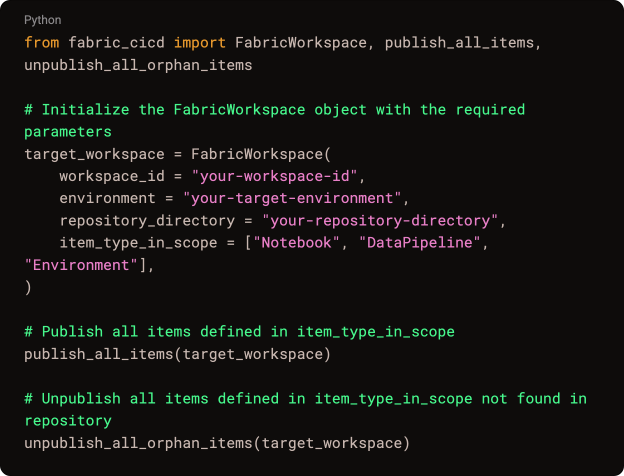
This library functions as a wrapper over the Fabric REST API, enabling the automation of specific actions with Fabric using Python code within a CI/CD pipeline.
The core class is FabricWorkspace, which allows you to publish items from a specified folder to a workspace. A YAML configuration file is also provided to specify deployment settings, such as target workspaces, item types, and parameter mapping.
This library is generally used in conjunction with Fabric Git integration to build a CI/CD pipeline based on items committed to Git from development workspaces.
To utilize fabric-cicd, you must first ensure your Fabric items are synced into Git using the Fabric Git integration. You can then programmatically deploy these objects to higher environments by running a Python script leveraging the fabric-cicd library as part of your CI/CD pipeline.
Terraform is a widely adopted Infrastructure as Code (IaaC) platform. It allows users to define the desired state of their infrastructure, and Terraform automatically deploys the objects in the correct order and applies the necessary settings.
Terraform supports various deployment targets. While it was initially focused on cloud providers like AWS and Azure, it also supports other platforms via "Providers."
The Fabric Terraform provider was introduced about a year ago and continues to evolve.
The provider currently supports most popular Fabric item types, including Warehouses, Lakehouses, Notebooks, and Data Pipelines, with some item types in preview (meaning they may lack certain settings or exhibit instability).
Typically, Terraform definitions are stored in a Git repository and deployed when an event triggers the CI/CD pipeline (e.g., a pull request or new branch creation). This setup offers flexibility and can be tailored to the specifics of your organization.
Here is an example of a Terraform definition for a Fabric Notebook:
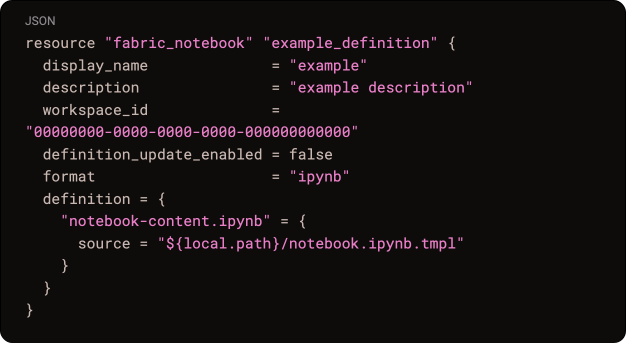
The definition specifies the notebook name, description, workspace ID, format, and a link to the file containing the notebook's contents (which is typically also stored in the Git repository).
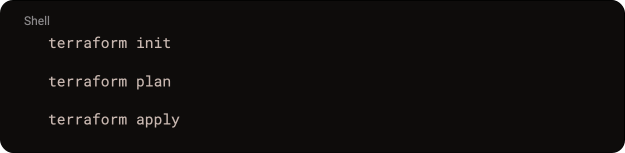
To deploy the items, Terraform commands are run as part of the CI/CD pipeline:
The core difference between the Terraform approach and the built-in Git integration lies in the direction of change. With Git integration, items are created in the Fabric UI and then checked into Git, keeping the UI and Git definitions in sync.
With Terraform, items are first defined and described as templates in Git and then deployed to Fabric. Changes made to items within the Fabric UI cannot be automatically synced back to Git. This limitation often reduces the general applicability of the Terraform provider, as Fabric is commonly used as an interactive environment where users actively make changes.
Consequently, the main applications for the Terraform provider are often deploying templated workspaces (e.g., quickly initiating new shared workspaces for teams) or for highly centralized environments controlled by a single team (e.g., workspaces containing centralized workflows managed by the IT department). The Terraform deployment workflow also introduces additional challenges related to manually editing Terraform definitions and testing them in a separate environment, which can make the process more complex and prone to human error.
Essentially, the workflow involves using workspaces connected via Fabric Git integration in lower environments to create and modify items, and then using an automated CI/CD pipeline with fabric-cicd to deploy these items to higher environments.
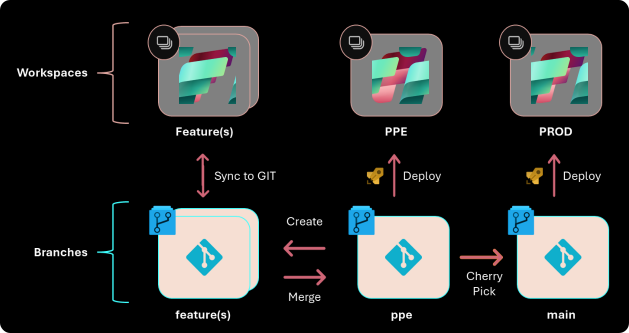
With multiple tools available that offer overlapping functionalities, there are several ways to implement the target CI/CD process. Key considerations for choosing an approach include: the target usage scenarios (deployment frequency, validation strategy, central vs. distributed change handling), the size of the team working with Fabric, workspace organization structure, technical expertise, and resource availability for supporting change management processes.
Based on T1A experience, CI/CD approaches in Fabric currently distill down to the two following scenarios:
1. "Simplified" Workflow
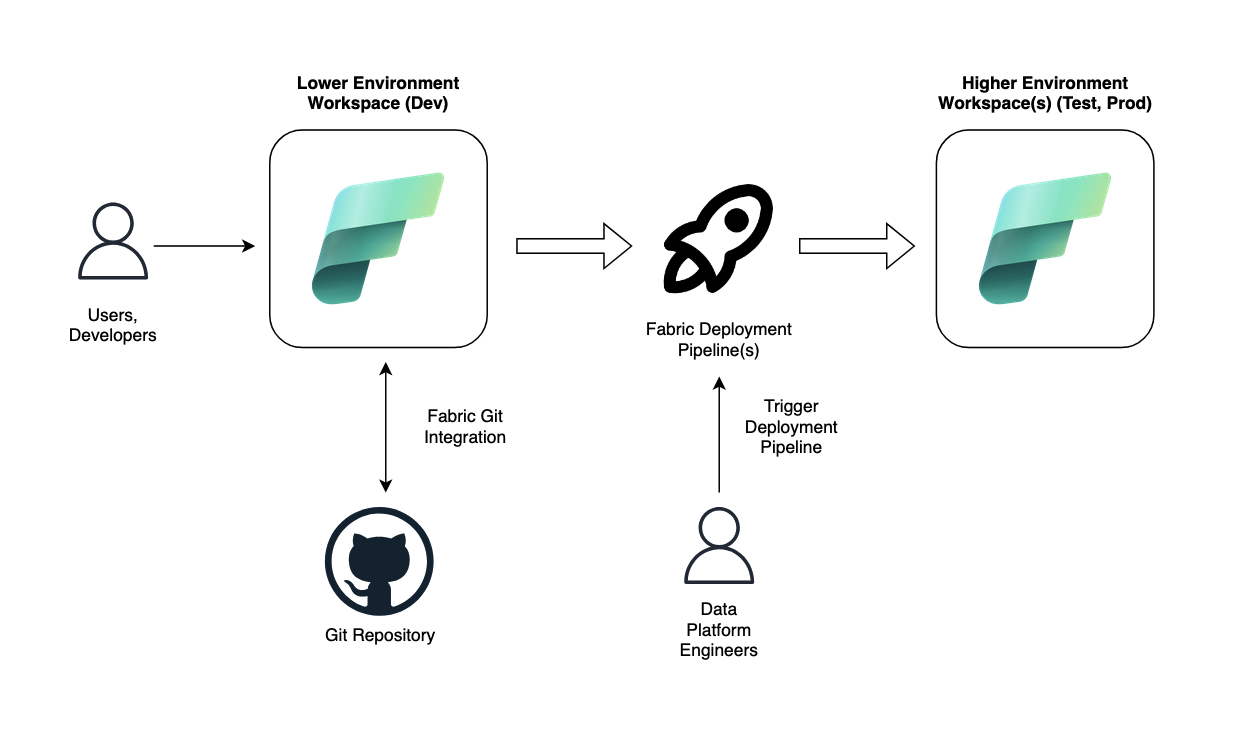
2. "Advanced" Workflow
fabric-cicd as the primary tool and the Fabric REST API.
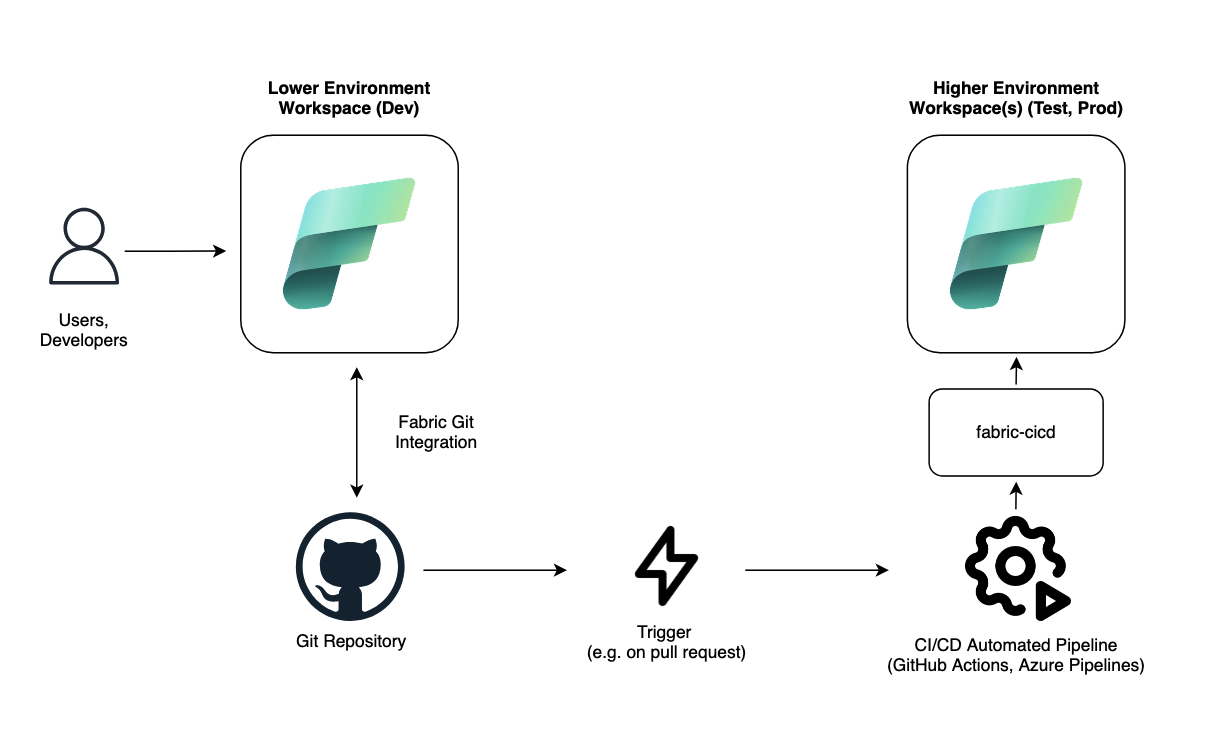
Selecting an approach which would fit best for the client will allow for an efficient CI/CD workflow without putting unnecessary burden on the data platform team and users/developers.
Overall, currently Microsoft Fabric has certain tools available for implementing CI/CD workflows, there are still limitations around:
However, the Fabric itself and the tools are rapidly evolving to bring more capabilities and support more features.
What we haven't covered in this article is the approach to Git branching and CI/CD workflow strategies, and also applying changes to the data between environments, which we will be exploring in upcoming blog posts. If you would like to explore the different approaches to Git branching strategy for Data Engineering teams, check out this blog post from my colleague Dmitriy Alergant.