
Version: 1.0
The SumSub-Salesforce Connector is a native Salesforce integration that enables seamless interaction with the SumSub verification platform for KYC/KYB processes.
The solution allows:
- Initiating verification processes directly from Salesforce
- Receiving verification results via webhooks
- Storing and managing applicant data within Salesforce
- Synchronizing verification statuses between systems
The connector is implemented fully within the Salesforce platform and does not rely on any middleware or third-party integration layers.
The integration follows a direct API-based architecture:
- Salesforce → SumSub: outbound REST API calls
- SumSub → Salesforce: inbound webhook callbacks
All data exchange occurs directly between Salesforce and SumSub over HTTPS. No intermediate systems are involved.
The package includes two custom objects responsible for storing applicant data and tracking verification events received from SumSub. The entity-relationship diagram of the data model is displayed below.
Please note that only several key fields are shown in the diagram for simplicity. In the actual system, these objects contain additional fields used for integration and configuration purposes.

This object represents a verification applicant within Salesforce and serves as the central record for managing the identity verification process. It stores the core information required to initiate, track, and manage the applicant verification lifecycle.
Key characteristics:
- Stores the SumSub Applicant ID used for API communication.
- Maintains the verification level assigned to the applicant.
- Stores the WebSDK link generated for the applicant verification session.
- Links the applicant to the corresponding Salesforce account.
- Stores the latest JSON payload received from SumSub for reference or troubleshooting.
This object stores webhook notifications received from SumSub during the verification process. Its primary purpose is to maintain a complete audit trail of verification events and status changes.
Key characteristics:
- Stores each webhook message sent by SumSub.
- Stores the review status returned by the verification process.
- Links the webhook message to the corresponding SumSubApplicant record.
- Stores the raw JSON payload received from SumSub.
This structure allows Salesforce to maintain a historical log of verification updates, which supports troubleshooting, compliance tracking, and process transparency.
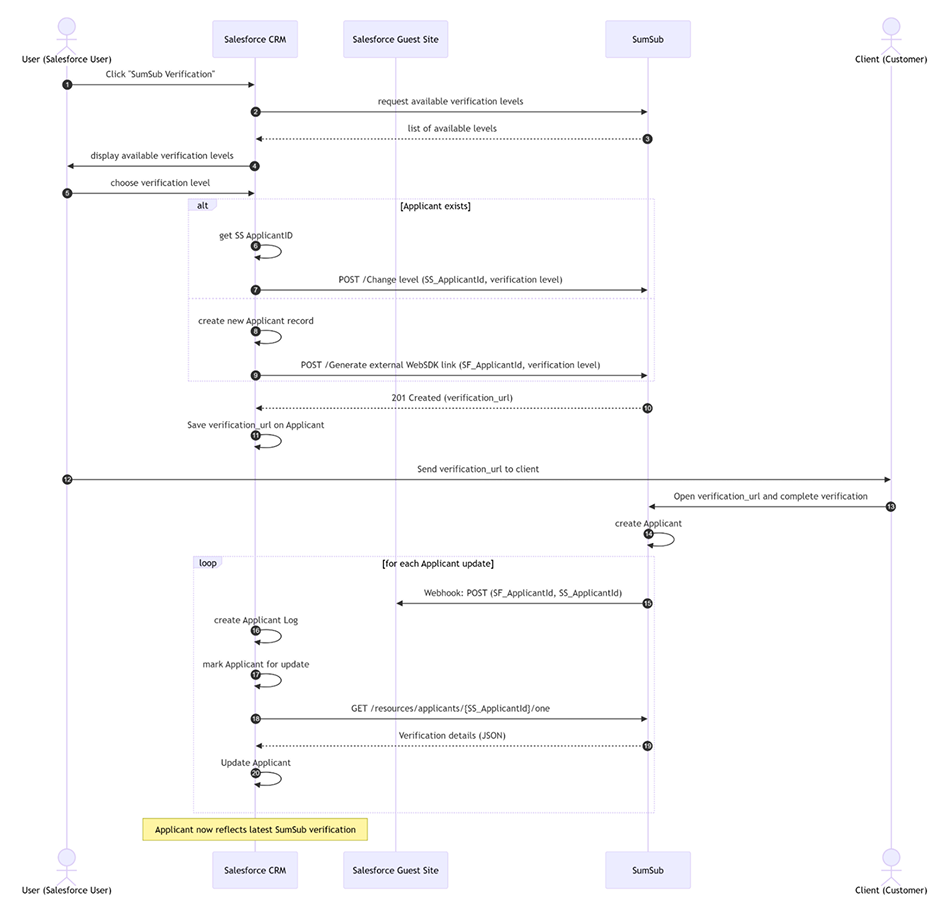
The diagram below illustrates the end-to-end interaction flow between Salesforce and SumSub during the applicant verification process.
It covers the full lifecycle, including retrieval of verification levels, applicant creation or update, generation of the verification link, client-side verification, and subsequent webhook-driven updates of the applicant status in Salesforce.
The integration relies on a set of SumSub REST APIs to manage the full applicant verification lifecycle. These APIs are invoked synchronously from Salesforce via Apex callouts. The complete list of utilized APIs is provided in the table below.
All API interactions are performed over HTTPS and authenticated using SumSub API credentials.
The connector is designed to operate within standard Salesforce environments and is compatible with the following configurations:
- Editions: Enterprise, Unlimited, Developer
- Clouds: Compatible with Salesforce core platform environments (e.g., Sales Cloud, Service Cloud, Financial Services Cloud). Not intended for use with Marketing Cloud or other standalone Salesforce products that operate outside the core CRM platform.
- User Interface: Lightning Experience only.
Salesforce Classic is not supported, as it is a legacy interface and does not provide the required UI capabilities for the solution.
The solution relies on standard Salesforce platform capabilities and requires the following conditions to be met:
- API access must be enabled in the Salesforce organization, as it is required for outbound communication with SumSub APIs
- Apex callouts must be permitted, ensuring that outbound requests to external endpoints are not restricted
- Salesforce Sites (public site capability) must be available to expose a public endpoint for receiving webhook callbacks from SumSub.
The webhook endpoint is implemented using a Guest User–accessible site and does not require additional licensing beyond standard platform capabilities
The solution relies on standard Salesforce platform capabilities and requires the following conditions to be met:
- API access must be enabled in the Salesforce organization, as it is required for outbound communication with SumSub APIs
- Apex callouts must be permitted, ensuring that outbound requests to external endpoints are not restricted
- Salesforce Sites (public site capability) must be available to expose a public endpoint for receiving webhook callbacks from SumSub.
The webhook endpoint is implemented using a Guest User–accessible site and does not require additional licensing beyond standard platform capabilities
API Communication
All outbound communication from Salesforce to SumSub is performed over HTTPS and authenticated using SumSub API credentials (API key and secret).
Webhook Security
SumSub webhooks do not support traditional authentication mechanisms. Instead, webhook requests are secured using a signature-based validation approach based on the HMAC (Hash-based Message Authentication Code) algorithm.
Each webhook request includes:
- A signature header (e.g., X-Payload-Digest)
- An algorithm indicator (e.g., X-Payload-Digest-Alg)
Salesforce validates the authenticity and integrity of each incoming webhook by:
- Recomputing the HMAC signature using the shared secret key
- Comparing it with the signature received in the request headers
Only webhook messages that pass signature validation are processed.
Webhook Endpoint
To receive webhook callbacks from SumSub, a public endpoint is exposed via Salesforce Sites using a guest user–accessible configuration.
Key characteristics:
- Publicly accessible endpoint (required for external callbacks)
- Restricted to webhook handling logic only
- Protected by mandatory signature validation
This approach ensures secure reception of webhook events without requiring additional authentication mechanisms.
Reference
For more details on webhook security and signature validation, refer to the official SumSub documentation: https://docs.sumsub.com/docs/webhook-manager
The performance of the integration is primarily dependent on the response time of the SumSub APIs.
As the solution operates through synchronous API callouts from Salesforce, the overall processing time for user-initiated actions (e.g., verification initiation, level retrieval) is directly influenced by the latency of external API responses.
Webhook processing is handled asynchronously and is typically near real-time, subject to delivery timing from SumSub.
Salesforce platform limitations, such as callout timeouts and response size limits, may also impact performance in specific scenarios.
The connector does not introduce independent service-level agreements for response times, availability, or uptime.
As the solution is fully implemented on the Salesforce platform and relies on external SumSub services, its availability and performance are dependent on:
- Salesforce platform availability and SLA (for application logic, data storage, and webhook processing)
- SumSub service availability and SLA (for API responses and webhook delivery)
- Approximate Uptime: 99.5% monthly uptime for Plugin functionality (excluding scheduled maintenance)
The connector itself acts as a lightweight integration layer and does not include any additional infrastructure that would affect system uptime or availability.
Installation Scope and Limitations
The connector installation includes the deployment of the package and a set of baseline configuration activities required to enable standard functionality.
The following activities are included as part of the connector installation:
- Deployment of the connector package into the target Salesforce environment (requires appropriate access to the Salesforce environment to perform installation and configuration activities; alternatively, deployment can be performed by a designated customer representative under guidance)
- Basic configuration of API connectivity and authentication settings (requires valid Sumsub API credentials, including API token and secret key, as well as access to Sumsub configuration to set up webhook endpoints; either appropriate access must be provided or configuration must be performed by a designated customer representative)
- Initial setup of webhook endpoint (Salesforce Site)
- Standard configuration required to enable the core verification flow
Additionally, the following optional features can be configured as part of the installation:
- Parsing and mapping of up to 20 fields from the Sumsub JSON response into Sumsub Applicant object in Salesforce
- Configuration of automated email notifications to applicants using standard Salesforce functionality (e.g., Flow)
Out of Scope
The following activities are not included in the standard installation scope:
- Mapping and parsing of a large number of additional fields beyond the baseline setup
- Custom data model extensions or complex object relationships
- Advanced transformation or enrichment of data received from Sumsub
- Any custom development beyond the standard connector functionality
Such activities may be delivered as additional customization work, subject to separate estimation and agreement.
Support Scope
The connector support is limited to assistance related to the standard functionality of the solution.
Support includes:
- Investigation of reported issues related to the connector behavior
- Identification and resolution of defects within the standard connector implementation
- Guidance on configuration and usage of out-of-the-box features
Support does not include:
- Customizations or modifications implemented in the customer’s Salesforce environment
- Changes to business logic beyond the standard connector scope
- Issues related to external systems, including Sumsub services or third-party dependencies
- General Salesforce platform support
Support requests should be submitted through agreed communication channels (e.g., email or ticketing system).
Each request should include:
- Description of the issue
- Steps to reproduce (if applicable)
- Relevant logs, payloads, or screenshots
Reported issues are:
- Reviewed and classified based on severity and impact
- Investigated within reasonable timelines
- Addressed through guidance or fixes, depending on the nature of the issue
Response and Resolution
- Response Time: Critical issues: 4 hours; High: 8 hours; Medium: 24 hours; Low: 48 hours.
- Support Hours: business hours 10 AM – 5 PM (CET).
Definitions of issues:
- Critical - The Plugin and/or integration services do not function, and there is no workaround for the problem.
- High - The Plugin and/or integration services are available, with major degradation to the licensee experience.
- Medium - Some degraded performance or unexpected results. A non-critical function is not working or is somewhat restricted.
- Low - The Plugin and/or integration services are working but exhibit some issues that do not impact the functionality. umSub webhooks do not support traditional authentication mechanisms. Instead, webhook requests are secured using a signature-based validation approach based on the HMAC (Hash-based Message Authentication Code) algorithm.
The connector is delivered as an unlocked package (gen2) deployed directly into the customer’s Salesforce organization, including all relevant source code and configuration components.
As an unmanaged solution:
- The package can be freely extended and modified within the customer’s Salesforce environment
- No automated upgrade mechanism is enforced
- Updates are delivered manually, when applicable
Updates
Any updates or enhancements to the connector are provided as
- Updated package versions
- Individual component updates (e.g., Apex classes, metadata)
Installation of updates is performed manually in the target Salesforce environment.
Additional Notes
As the solution is delivered with source code, customers may independently maintain, extend, or adapt the connector according to their internal requirements and governance processes.
The connector itself does not store or retain any data independently. It operates as a data transfer and orchestration layer between Salesforce and SumSub.
All data processed by the connector is stored exclusively in:
- Salesforce (as part of standard CRM data storage)
- SumSub (as part of the verification platform)
Data retention and deletion are governed by the respective policies and configurations of these systems.
- Salesforce: Data retention and deletion are managed according to the organization’s internal policies and Salesforce platform capabilities
- SumSub: Data retention and deletion are managed in accordance with SumSub’s data retention policies and applicable regulatory requirements
The connector does not introduce any additional data persistence, storage mechanisms, or retention logic beyond what is defined in the underlying platforms.
In the event of termination of the agreement with SumSub or T1A, the existing connector implementation will continue to operate without immediate restrictions, subject to the availability of SumSub services or Salesforce services.
However, no further updates, enhancements, or maintenance releases will be provided for the connector.
Customers may continue using the existing implementation at their own discretion, including maintaining or extending the solution within their Salesforce environment if required.


